
B2B Car Rental Software for Fleet and Dealer Management
Our B2B car rental software lets you sell your own fleet and a connected supplier's cars from the same panel, run your branches, roles and sub-agencies, and collect booking requests under your own brand.
B2B Travel is developed by Diji Tech.


Your Fleet and the Supplier in One Search
Your cars and the connected supplier's cars appear in one list, with the source of each result shown.
Data Separated by Branch and Role
Vehicle, booking and payment records of a branch you are not authorised for are excluded at the query stage.
Take Requests Under Your Own Brand
A rental company manages the booking request site on its own domain directly from the panel.
What is B2B car rental software?
The Car Rental Agency System is a B2B rental platform developed by Diji Tech that lists an agency's own fleet and a connected supplier's cars in the same search result. Agency staff search for the customer, take the prebooking, hand over the car and settle any differences found at return one by one. Records for contracts, damage, inspections, tolls and traffic fines sit on the same operations screen. The hierarchy covers sub-agencies, branches and user roles, and every branch reaches only its own data. Businesses in the rental company role can also run a request website under their own brand and domain to collect bookings.
Car rental from search to fleet operations
All records, names and amounts shown in the videos are samples.

Car search on the agency side
Searches use the pick-up place, the return place, the date and the time; the car can be returned to the same point or a different one. Each result card shows gearbox and fuel type, seats and bags, the total mileage allowance, deposit, minimum driver age, years with a licence and free cancellation. Results can be narrowed by brand, class, number of seats, gearbox, fuel and mileage limit, and laid out as cards or as a table in price order.

Customer quote and car detail page
The agent ticks the cars to send to the customer in the list and creates a quote. On the car page the agent picks either a ready cover package or individual covers, then enters a quantity for each extra. The booking summary shows the car price, the cover amount and the extras on separate lines. The rental conditions section states total mileage, the excess mileage charge, deposit, driver age and years with a licence.

Fleet, rate plans and extras
The rental company manages its cars with plate, fleet number, class, capacity and status. Rate plans are linked to a price list and set up by vehicle class, and each plan is priced through season periods. Extras get separate pay-now and pay-at-office prices and can be charged per day or per booking.

Daily fleet operations
The operations screen brings together the day's hand-overs and returns, ongoing rentals and cars whose service or inspection is coming up. The service log records the service date, mileage in and out, the cost and the number of days the car spent off the road. The HGS toll log records, for every pass, whether the customer or the company pays it and whether it should be billed on the invoice.
How the administrator, GSAs and agencies work together
The main administrator, GSAs and agencies use the same system, each through their own account. The selling price is built along this chain, with every level adding its own rule on top.
What each role does
- 1
Main administrator
Opens agency accounts and decides whether each one is Standard or GSA, whether it has DMC rights, what its balance is and which modules and menus stay switched on. A new account starts out passive and is activated once it is ready.
- 2
GSA
Sets up sub-agencies of its own, looks after their balances and writes the pricing rules that apply to them.
- 3
Agency
Reports to the main administrator or to a GSA. It signs in with its own users to search and sell, adding its own rule on top of the price. With DMC rights switched on, it also runs its own inventory. The rules and amounts added by the levels above stay invisible to it.
Highlights of the B2B car rental software
- Vehicle card, photo gallery and equipment details
- Seasonal price lists with hourly, daily, weekly and monthly tiers
- Vehicle class catalogue with SIPP codes and rental terms
- Insurance covers, insurance packages and extras sales
- One-way fee matrix for returns at a different location
- Branch hierarchy and vehicle transfers between branches
- Prebooking, confirmation, hand-over and return steps
- Rental contract, change history and signature status
- Damage, inspection, service and tyre records
- Toll passes and traffic fines, with the liable party assigned
- Customer card, duplicate record check and blacklist
- Payment, invoice, refund invoice and pre-authorisation
- Corporate fleet contract, vehicle assignment, invoice calendar
- Sub-agency tree and module activation per agency
Finance and account tracking
You follow each agency's balance, account movements, invoices and reports from the same place.
Balance
Balances are assigned to agencies by the main administrator and GSAs; an agency with the wallet screen enabled can also top up from its own panel.
Account movements
The agency follows every movement on its balance in the panel; if the accounting system supports it, an account statement is available too.
Invoices
Sales and commission invoices can be viewed in the panel.
Reports
Profitability, sales and commission reports are ready in the panel.
What a car rental agency system gives you
- You put your own cars and the supplier's inventory on sale from one screen.
- The commission of the staff member who sold is recorded with the booking.
- Mileage, fuel and damage details are completed on a single form at hand-over.
- Differences found at return are posted to the account item by item.
- Inspection and insurance renewal dates don't slip past you.
- A blacklist check halts a risky renter before the booking goes through.
- Fleet contracts let you rent long term to corporate customers.
- Deposit, mileage allowance and driver age are spelled out in the quote.
- You define your business by role, as a rental company, a broker or both.
- A closed sub-agency loses its search and booking access as well.
- An agency sees its own rentals, while a GSA sees those of its whole network.
- Total exposure on long-term rentals is capped by a set limit.
- Asynchronous search architecture
- Capacity for more than 7 billion queries a day
- Quick to learn, fast to use
- Build an unlimited GSA and sub-agency network
- Works in multiple languages and currencies
- Support ticket system built into the panel
- Announcements to your agencies
- Option to provide a RESTful API to your customers
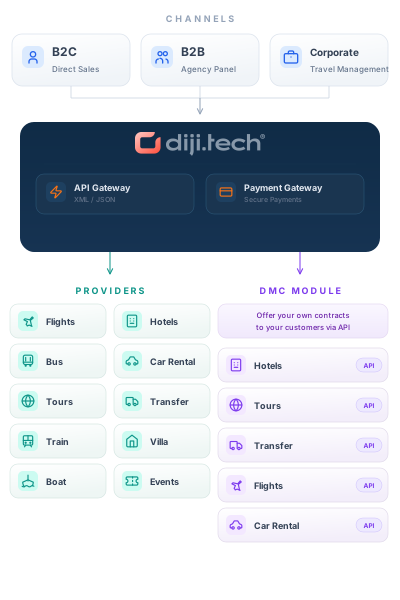
Vehicle sources and connections












- Yolcu360
- Your own fleet inventory
- Supplier account per agency, stored encrypted
- Booking site on your own domain, carrying your brand
Frequently asked questions
- How do I let my sub-agencies sell car rentals?
Simply switch the car rental module on in the per-agency module permissions screen; while it is off, that agency never sees the search and booking screens. An agency with GSA rights can open its own sub-agencies. Module permissions are granted from agency management in the B2B travel agency software that all products share.
- Should I sell my own fleet or a supplier's inventory?
You can use both together. Your fleet and the connected supplier's fleet are searched in parallel and merged into a single list, with the source of each result shown. A source that answers slowly or returns an error does not break the list; it simply brings no results while the others stay visible.
- Which car rental supplier is connected today?
Yolcu360 is the external supplier currently live; search, prebooking, confirmation and status calls all work. As the supplier offers no cancellation service, cancellations are recorded by hand from the operator panel.
- Can my branches see each other's records?
No. Once the branch structure is enabled, vehicle, booking, contract and payment records are filtered by the branch they belong to. Even a direct request for an unauthorised branch's data returns an empty result.
- Can I launch my own website with this system?
Businesses in the rental company role can open a request site that runs on their own domain and carries their logo and colours; booking requests are collected through it. Payments for bookings coming from the site are processed in the operations panel.
Other B2B modules
This module runs on the B2B Travel B2B travel agency software stack; add any of the modules below to the same panel and open them to your sub-agents on a single account.
- Flight Ticket Agency System Search scheduled flights from GDS, NDC and airline sources on one screen, and let your resellers sell those tickets at your price and within your credit limits.
- Hotel Agency System Show supplier hotels and the hotels you contract yourself side by side in one search, and open sales to your sub-agencies at the price you set.
- Charter Flight Ticket Software Plan the seats on your chartered aircraft, series departures and load-based fares in one panel, and let your agencies sell those seats from the same screen.
- Flight Group Booking Software Handle group flight requests in one agency panel, from airline offers and option deadlines to name lists and staged payments.
- Tour Agency System Design your own tour packages, manage departure groups and allotments, and let your resellers sell tours at agency-specific prices.
- Transfer Agency System Sell transfers run with your own vehicles and those bought from suppliers in one panel, with every step from dispatch and driver assignment to settlement and margin tracked on one record.
- Bus Ticket Agency System Search bus departures on one screen and let your resellers sell tickets from the seat map at your price and within their credit limits.
- Event Ticket Agency System This B2B event ticketing software brings supplier activities and the events you organise into one screen, so your sub-agencies can sell those tickets under session and quota control.
- Villa Rental Agency System This B2B villa rental software brings your contracted villas and channel villas into one panel, so you can sell them to your reseller network with an occupancy calendar, seasonal rates and agency-specific prices.
- Visa Agency System This B2B visa software opens the visa products you build in the panel to your dealer and sub-agent network, and brings chained pricing rules, credit limit checks and application operations onto one screen.
- Yacht Rental Agency System This B2B yacht charter software combines your own boats with supplier inventory in a single search, and your sub-agents sell yacht charters at agency-specific prices within their credit limits.
Ready to set up your car rental agency system?
Let's talk about your fleet, branches and dealer network; we'll show the right setup in a live demo and send our proposal.