
B2B Charter Flight Software: Block Seats, Series Departures and Agency Allotments
B2B charter flight software that lets you manage the seats on the aircraft you charter, its series departures and its load-based price from one panel. Your dealers sell those seats from the screen they use every day.
B2B Travel is developed by Diji Tech.


A Separate Seat Stock for Every Leg
Outbound and return legs keep their own quotas, so overselling is stopped at stock level.
Automatic Pricing by Load Factor
As the aircraft fills, percentage or fixed-amount tiers kick in and recalculate the base fare.
Sell to Your Dealers from the Same Screen
Your charter flights appear in the flight search screen your sub-agencies already use.
What is B2B charter flight software?
Developed by Diji Tech, this B2B charter flight software is built to define and sell the seat stock of a chartered aircraft, covering both inventory and operations. Travel agencies and tour operators manage their own block seats end to end with this charter seat management system. One-way or round-trip departures, a separate seat quota for every leg, fares by passenger type and price tiers that kick in as the load factor climbs are entered in the panel. Flights put on sale appear in the flight search screen sub-agencies use every day, together with results from outside suppliers, and allotment quotas and agency pricing rules are applied at the moment of sale.
Charter seat management system screens
All records, names and amounts shown in the videos are sample data.

Charter flight inventory
All your charter flights sit in one list, split into Draft, Active and Inactive tabs, filterable by season, exportable to Excel and printable. Weekly chains are grouped under one heading, and each flight shows how many seats are free, held and sold. Outbound and return legs have separate quotas, a connection can be added to any leg and the overbooking margin is set flight by flight. With the weekly repeat option, a series of 1 to 52 weeks is built from a single form.

Fares, load tiers and fees
Base fares and taxes for adults, children and infants are entered in the currency you pick. Once load tiers are defined, the base fare rises by a percentage or a fixed amount while the aircraft fills up. For each flight you set the empty seat penalty and the empty seat allowance (BKH) separately; the free period for name changes and the fixed fee after it live in the charter settings.

Seat allotments for agencies
You set seats aside for particular agencies; sold and remaining seats are tracked line by line, and the total allotment can never go beyond the aircraft's capacity. Unsold allotment is released to the general pool automatically, either a chosen number of days ahead of departure or on a fixed date you pick. Quota enforcement has three modes (off, strict, or spilling over into the general pool), and you also decide the provider name under which agencies see your charter flights.

Group block bookings and monthly view
For a nameless group block, the blocked, named and remaining seats are followed in one row together with the name deadline. Names are added a few at a time, and on approval every passenger is linked to a PNR of their own. The Charter Groups screen groups the chains by month of departure and shows seat use and load factor.

Flight load report
The load report gives the sold, held and total seats for every flight with a fill bar and a percentage, and you can filter it by season or date range.
B2B charter flight software features
- Charter flight catalogue with draft, active and inactive states
- Validation of legs, connecting segments and the route chain
- Seat quota per leg plus a capped overbooking margin
- Separate base fare and tax for adults, children and infants
- Branded fare packages carrying refund and change permissions
- Season set-up and weekly repeating series departures
- Seat allotments for agencies with quota enforcement options
- Waitlist with automatic promotion to a timed option
- Nameless group blocks, with names entered step by step
- Manual sale, cancellation and no-show marking in the panel
- Passenger manifest and sales list downloaded as CSV
- A multi-layer, agency-based rule chain on the seat price
What a charter seat management system gives you
- You open sales to your dealer network without setting up a separate integration.
- You fill empty seats through your pricing policy rather than last-minute discounts.
- Allotted seats that have not sold go back to the general pool on their own when the time comes.
- Demand for a full flight is not lost; it goes onto a waitlist.
- You secure your block seats before the name list arrives.
- A whole season's programme is created with a single form.
- You know a flight's profitability and break-even point before it departs.
- You follow the empty-seat obligation in your contract separately for every flight.
- Agencies see your inventory under your own brand name.
- Each agency can buy the same seat at its own price and commission.
- An agency's credit limit is checked before any seat is blocked.
- Access to the inventory and sales screens is limited according to the user's role.
- Parallel (asynchronous) supplier queries
- Capacity for more than 7 billion queries a day
- Quick to learn, fast to work with
- Grow a GSA → sub-agency network without limits
- Selling in several languages and currencies
- Support ticket system built into the panel
- Announcements to your agencies
- Option to expose your own RESTful API
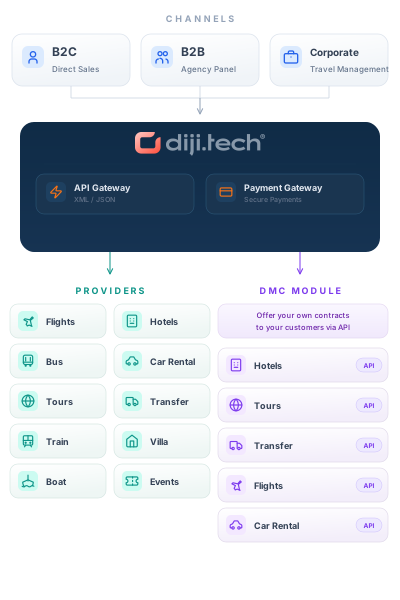
Connections and exports
- Your own charter inventory; no outside supplier connection needed
- Distribution to agencies' flight search, in the same flow as external results
- The standard flight payment step and transfer to accounting
- CSV output for the passenger manifest and sales list
Frequently asked questions
- What do I need to do so my dealers can sell a charter flight?
Create the flight in the charter catalogue, then fill in its legs, seat quota and passenger-type fares. As soon as you put it on sale, your sub-agencies can sell it from their usual flight search screen.
- How do I set seats aside for a sub-agency and apply the quota?
You split the seats by agency on the flight summary screen. There are three options for quota enforcement: off, strict, or a mode that moves the overflow to the general pool.
- What happens to requests that arrive once the flight is full?
A waitlist entry is opened for the full flight. If a seat comes back into the pool, the next waitlist entry moves up to a timed option and the seat is kept for it for 24 hours; if that time runs out, the turn passes to the following entry.
- Can I set block seats aside before the name list arrives?
Yes. With a group booking you open a block without names and add the names step by step later. Seats left without a name can be released, and once the block is approved the named seats turn into individual sales.
- How does this software differ from scheduled ticketing and group bookings?
What you sell here is a limited number of seats that you own; quotas, load-based prices and allotments all stem from that ownership. Selling live scheduled seats from outside suppliers is done with the Flight Ticket Agency System, and getting group fares from airlines with the Flight Group Booking Software.
- Which charter suppliers do you work with?
There is no outside supplier connection in this module; the seats you offer belong to your own charter flight. It is registered in the system as an internal flight provider, and you can change the name agencies see to match your brand. Take a look at our B2B travel agency software page for our other products.
Other B2B modules
This module runs on the B2B Travel B2B travel agency software stack; add any of the modules below to the same panel and open them to your sub-agents on a single account.
- Flight Ticket Agency System Search scheduled flights from GDS, NDC and airline sources on one screen, and let your resellers sell those tickets at your price and within your credit limits.
- Hotel Agency System Show supplier hotels and the hotels you contract yourself side by side in one search, and open sales to your sub-agencies at the price you set.
- Flight Group Booking Software Handle group flight requests in one agency panel, from airline offers and option deadlines to name lists and staged payments.
- Tour Agency System Design your own tour packages, manage departure groups and allotments, and let your resellers sell tours at agency-specific prices.
- Car Rental Agency System Open your fleet and supplier inventory for sale in one panel, grow by managing branches, roles and resellers, and take requests under your own brand.
- Transfer Agency System Sell transfers run with your own vehicles and those bought from suppliers in one panel, with every step from dispatch and driver assignment to settlement and margin tracked on one record.
- Bus Ticket Agency System Search bus departures on one screen and let your resellers sell tickets from the seat map at your price and within their credit limits.
- Event Ticket Agency System This B2B event ticketing software brings supplier activities and the events you organise into one screen, so your sub-agencies can sell those tickets under session and quota control.
- Villa Rental Agency System This B2B villa rental software brings your contracted villas and channel villas into one panel, so you can sell them to your reseller network with an occupancy calendar, seasonal rates and agency-specific prices.
- Visa Agency System This B2B visa software opens the visa products you build in the panel to your dealer and sub-agent network, and brings chained pricing rules, credit limit checks and application operations onto one screen.
- Yacht Rental Agency System This B2B yacht charter software combines your own boats with supplier inventory in a single search, and your sub-agents sell yacht charters at agency-specific prices within their credit limits.
Open your charter seats to your dealer network
Plan your flight programme and allotment structure together with our team. Get in touch for a free demo and a quote tailored to you.