
Delpax
Delpax.com.tr
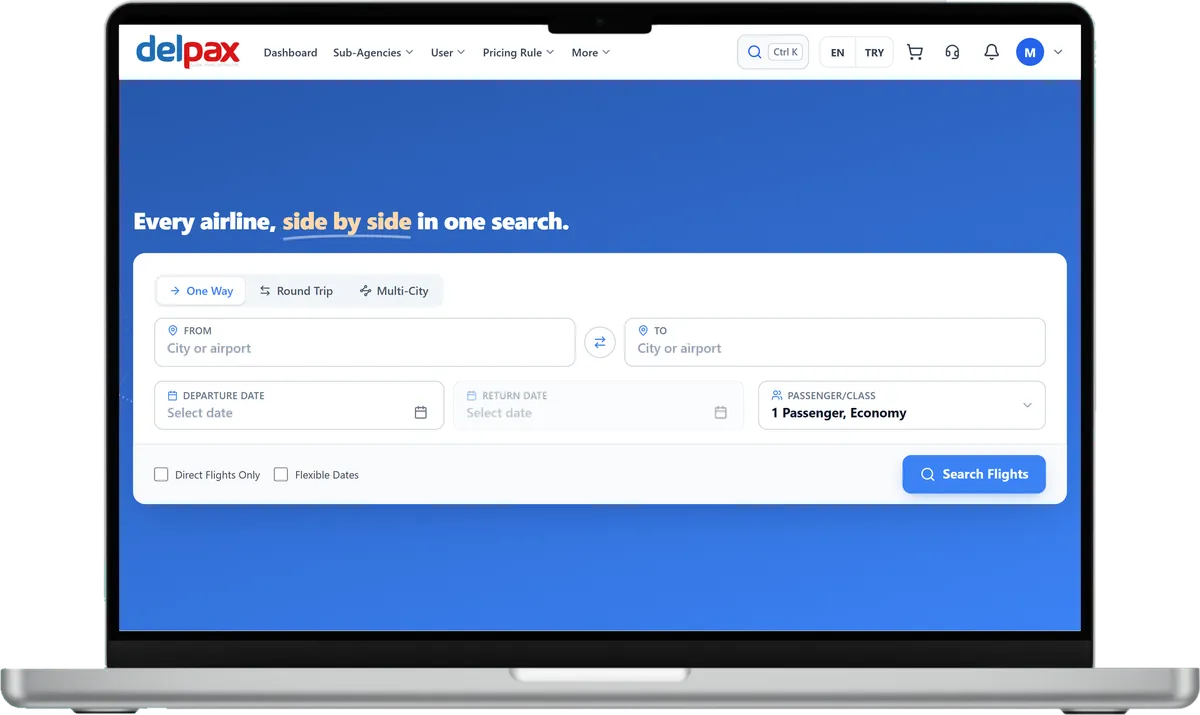
Delpax's B2B panel for travel agencies, where flights, hotels and transfers are searched from a single screen.
Visit the siteB2B flight booking software that gathers scheduled flights from GDS and NDC sources and from direct airline links into a single search. Your sub-agencies sell tickets under your pricing rules and within the credit limit you set.
B2B Travel is developed by Diji Tech.


Every active supplier is searched in a single query, and scheduled options are ranked in one combined result list.
Each agency sees the same flight priced by its own rule; payment comes from the account balance or a card.
Every operation arrives as a quote first, so you see the penalty and refund amount before you approve.
This B2B flight booking software, developed by Diji Tech, runs scheduled flight sales from start to finish inside the agency panel. Flights from GDS and NDC sources and from direct airline links appear on one search screen. It is designed for travel agencies and tour operators whose staff and reseller network sell tickets on behalf of their customers. Each sale moves through three stages: booking, payment and ticketing. Agency-level pricing rules and commission, payment from the current account or by card with 3D Secure, plus voids, refunds and reissues, are all handled in the same flight ticket agency system. Separate modules cover selling your own block seats and requesting airline group fares.

Look up one-way and round-trip flights, or multi-city trips of up to 6 legs. Fares for the dates around your chosen day appear above the result list, and the day before or after is a single click away.

Each card shows the airline, flight number, departure and arrival times, duration, baggage and total price. The details add the cabin class and checked baggage allowance, plus the terms for cancelling or changing. You can filter the list by number of stops, cabin, airline, time window and baggage.

Press Create offer and tick the flights that suit; the options you choose become a PDF offer you can send to your customer.

Open the results as a list, cards or a table and sort them by price, departure time or flight duration. In a round-trip search both directions sit next to each other, each with its own sorting and day switch.

An agency defines percentage or fixed-amount rules at its own level, while the rules and amounts above it stay closed to it. You can see a rule's effect on a sample fare and try it on a sale before saving.
The main administrator, GSAs and agencies use the same system, each with an account of their own. As the supplier's ticket price moves along this chain, every level puts its own rule on top.
Creates agency accounts and picks the Standard or GSA type, DMC rights, balance and which modules and menus are enabled. A new account starts inactive and is switched on once it is ready.
Opens the sub-agencies that report to it, manages their balances and defines pricing rules for their ticket sales.
Reports to the main administrator or to a GSA. Logs in with its own users to search flights, sell tickets and add its own pricing rule. With DMC rights it also manages its own inventory, while the rules and amounts of higher levels remain invisible to it.
Balances, account movements, invoices and reports for your ticket sales sit together in the same panel.
Balances are given to agencies by the main administrator and GSAs; with the wallet screen enabled, agencies can also load balance from their own screen.
Agencies follow the movements on their current account in the panel; if the accounting system allows it, a statement is available too.
Sales and commission invoices are available in the panel.
Sales, profitability and commission reports are ready in the panel.












Delpax
Delpax's B2B panel for travel agencies, where flights, hotels and transfers are searched from a single screen.
Visit the sitePricing rules are applied in turn at operator, GSA and agency level and are written as a percentage or a fixed amount. You can tie a rule to a supplier, an airline or a fare range, and the search result shows which rule was applied.
The cancellation request comes in as a quote first, so the penalty and the amount to be refunded are visible before you approve. Booking cancellation, void and refund run as separate operations. Where a source does not allow online cancellation, the reason is shown on screen.
A change also goes through a quote and approval step. The system looks for the new date with the same source the ticket was issued from, then works out the fare difference and penalty. The price is checked once more at approval, and if the amount has changed you see it first.
On the GDS side Amadeus and Travelport (1G/Galileo) are connected, Turkish Airlines through NDC, and Pegasus and AJet as direct airline links; the consolidators are Arkman, iFlyRes, BiletBank, TravelFusion and Paximum. You can enter your own account credentials, which are stored encrypted, and adding a new supplier requires no code change.
This module is for scheduled flights: content comes live from outside suppliers, and the ticket is issued at the moment of sale. Selling your own seat stock is the job of the Charter Flight Ticket Software, and managing airline group fares belongs to the Flight Group Booking Software. You can see every module together on our B2B travel agency software page.
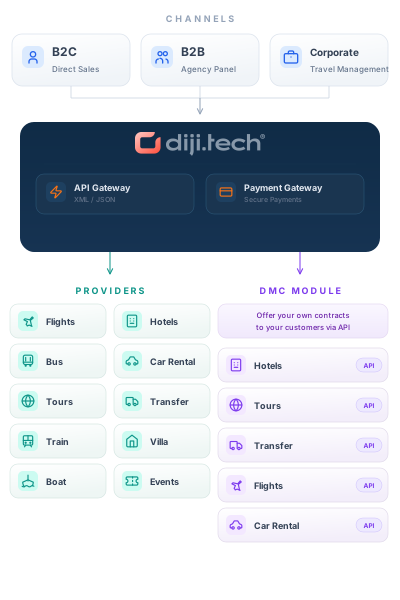
This module runs on the B2B Travel B2B travel agency software stack; add any of the modules below to the same panel and open them to your sub-agents on a single account.
Plan your supplier connections and agency structure together with our team. Get in touch for a free demo and a quote tailored to you.